
Jira and Autotask, connected without custom code
Autotask-certified integration. Your customer's development and IT team stays in Jira. You stay in Autotask. Tickets, time entries, and field values sync both ways without anyone acting as the intermediary.
Trusted by IT teams and service providers

















 Jira
Jira  Autotask
 Why Jira and Autotask don't sync cleanly out of the box
Jira is built for software and IT teams. Autotask is built for MSPs. Making them work together cleanly takes more than just an API connection.
Your customer's Jira project structure doesn't map to your Autotask queues
Jira organises work into projects and issue types. Your Autotask uses service desks, queues, and ticket categories. Without a mapping layer, tickets from your customer land in the wrong queue with incorrect defaults - your team has to fix them before they can action them.
Priority labels in your customer's Jira don't translate to your Autotask urgency levels
A 'High' priority in your customer's Jira doesn't automatically become the right urgency level in your Autotask. Without a mapping layer, SLA tracking breaks on your side and your team is working blind on which tickets to prioritise.
Time your team logs in Autotask isn't reflected in the shared ticket record
Your technicians track time in Autotask against your client SLAs and for billing. Without a sync, none of that time data is visible on the Jira side - making it harder to justify effort to your customer or align on what has been worked.
Updates your team posts in Autotask don't reach your customer's Jira
When your team updates a ticket in Autotask, that update doesn't appear in your customer's Jira automatically. They're left with stale information - and someone on your team has to relay it manually, adding overhead to every ticket that crosses the boundary.
How you connect
Up and running in under a day. No coding, no project, no professional services.
Connect your platforms
Add credentials for Jira and Autotask through the guided setup. No developer required - Support Fusion is Autotask-certified and the configuration runs from both sides.
Configure your workflow
Map Jira projects and issue types to Autotask queues and categories. Set priority mappings, comment rules, and time entry sync preferences.
Go live
Run a dry sync to verify the result on both sides, then switch to automatic. Your customer stays in Jira. You stay in Autotask.
We'll look after everything and help you along the way.
See it in action
Walkthroughs from the Support Fusion team.

When Jira automations conflict with your sync
Investigating a real case where closed tickets kept reopening after sync runs - the cause was a Jira Service Management default automation triggered by the sync's system user.
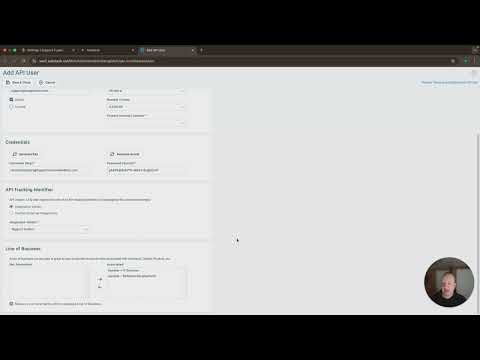
Setting up your Autotask API connection
Creating an API user in Autotask, setting the correct security level, selecting Support Fusion as the vendor, finding your regional API URL, and testing the connection.
What's included
- Sync
Bi-directional ticket sync
No one has to pull anything. It just syncs.
Every update, comment, and status change flows both ways. Assign a ticket in one platform and it stays bonded across both until it closes.
Watch demo - Sync
Time entry sync
Billable time stays accurate on both sides.
Time logged in ConnectWise, Autotask, or HaloPSA syncs to the linked ticket in the other platform. No gaps in billing records.
Watch demo - Configuration
Field mapping
When it's status A on their side, what needs to happen on yours?
You define the business-level rules once. Status, priority, category, board - everything translates automatically. No one has to do that work again.
Watch demo
Why not just build it yourself?
Most teams try manual coordination or a custom script first. Here's how those compare.
Manual coordination
Someone copies tickets between platforms by hand. Time entry data stays siloed. The process lives in one person's head and disappears when they do.
Custom integration
A developer builds an API connection. It works until something changes - a field update, a platform upgrade, an API version bump. Then it breaks, and only one person knows how to fix it.
Support Fusion
Both teams stay in their own platform. Tickets and time entries sync automatically. Field rules are configured once. Autotask-certified, no developer required.
Frequently asked questions
Do I need to write any code to set up an integration?
Which platforms does Support Fusion support?
Can Support Fusion sync platforms within our own organisation?
Can I test the integration before going live?
Is ticket syncing bi-directional?
Can I control which fields are shared between platforms?
Can we control which comments and notes are shared?
Do timestamps sync for SLA tracking?
Ready to connect Jira and Autotask?
Book a walkthrough and we'll map your specific setup - priorities, time entries, and field mapping included.
Book a demo